Showcase: batch reactor R-101
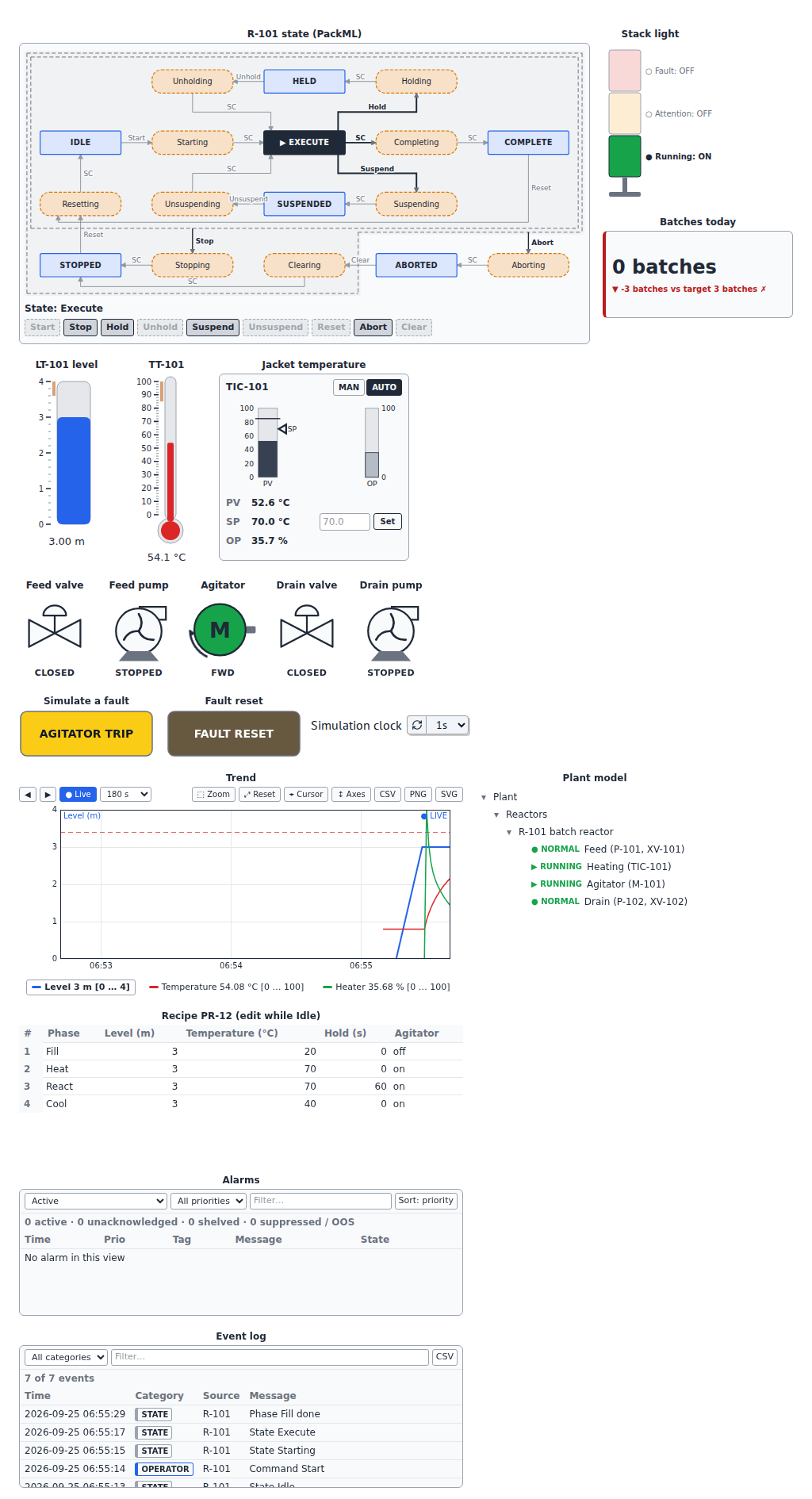
One industrial system of medium complexity, the same on every host: a jacketed batch reactor with its complete operator station. A feed pump and valve fill it, an agitator stirs it, a PID loop heats the jacket, a drain pump empties it; a PackML state machine runs each batch through the phases of an editable recipe, with alarms, a stack light, trends, an event log, batch counters and the plant model.
▶ Open in the browser (marimo) ▶ Open in JupyterLite Julia: KaimonSlate.jl notebook
The first two run entirely in your browser, with nothing to install (the first load downloads the Python runtime and takes a few seconds).
Note
The reactor is simulated; the notebooks are not meant to control real equipment (see the safety notice).
What to try
- Press Reset, then Start on the state diagram. The stack light turns green; the valves, pumps and agitator follow the phases (Fill, Heat, React, Cool, then the drain in Completing); the trend draws the level, the temperature and the heater output; the event log records every command and state.
- While the reactor is Idle or Complete, edit the recipe: the next batch uses the new levels, temperatures and hold time. The table checks every cell against its limits.
- Press AGITATOR TRIP: an alarm is raised, the batch is held, the agitator and the plant model show the fault. Press FAULT RESET, then Unhold.
- On the faceplate, switch the temperature loop to MAN and set the output, or change the setpoint in AUTO; Stop or Abort the batch at any time.
One system, three hosts
| Host | Notebook | Who runs the process |
|---|---|---|
| marimo, in the browser or locally | lite/marimo/batch_reactor.py |
Python: the widget objects, a marimo refresh clock |
| JupyterLite, JupyterLab, Notebook 7 | lite/content/batch_reactor.ipynb |
Python: the widget objects, an asyncio task |
| KaimonSlate.jl (Julia) | examples/kaimonslate/batch_reactor.jl |
Julia: no Python kernel; the widgets are bound to trait dictionaries |
In Python, the process model reads and writes the widget objects
(machine.state_complete(), tank.value = …, trend.add(…)). In Julia,
the same front-end modules are hosted without a Python kernel, through the
trait contract: Julia writes traits with set_bind
and sends the data messages of the trend and the batch counter with
afm_emit, while the widgets apply the operator actions themselves
(commands, recipe edits, setpoint and mode changes, alarm acknowledgements)
and Julia reads the results from the bound dictionaries.
Running the Julia notebook
The notebook needs KaimonSlate.jl
and its SlateAFM extension, which hosts anywidget front-end modules
(it ships in the KaimonSlate.jl repository under
examples/extensions/SlateAFM). pypi_afm installs the Python package with
the system pip to read its front-end module and trait defaults; nothing
Python runs afterwards. Until the package is published, set AWI_PACKAGE
to a wheel of it:
ENV["AWI_PACKAGE"] = "/path/to/anywidget_instruments_industrial-0.1.0.dev0-py3-none-any.whl"
then open examples/kaimonslate/batch_reactor.jl in Kaimon Slate and press
Run simulation. The browser side of the notebook (every trait and message
it writes, every operator action it reads) is checked by an end-to-end test
on a host page that reproduces SlateAFM (e2e/host/reactor.html); the
Julia code itself is not run by the continuous integration.
Widgets and references
| Function | Widgets | References |
|---|---|---|
| Machine states and commands | StateMachine (PackML model) |
ISA-TR88.00.02 |
| Recipe phases | RecipeTable |
ISA-88 / IEC 61512-1 |
| Temperature control | PIDFaceplate with PID |
ISA-101 |
| Process values | Tank, Thermometer |
|
| Final elements | Valve, Pump, Motor |
ISA-5.1 (tags, symbols) |
| Alarms and events | AlarmList, EventLog, PushButton (fault and reset) |
ISA-18.2 / IEC 62682 |
| Status at a glance | StackLight, KPITile |
IEC 60073 (stack light colors) |
| History | TrendChart |
ISA-101 |
| Plant structure | EquipmentTree |
IEC 62264 |
These standards inspired the widgets; the library does not claim conformity with them (see Standards and references).